
The record of everything about your home.
The things in it, the people who work on it, what it has cost, and everything that has happened to it, in one place. Keep it for yourself, or hand it to a buyer, an insurer or the next owner.
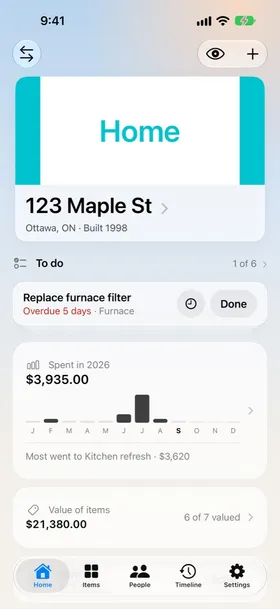
Show what's been done, when, and by whom.
Every item, its value and its receipt, already listed.
Manuals, paint colours and the plumber's number.
Know when the furnace filter is due, without remembering.
Your home's whole story, room by room.
Items
Appliances, systems and belongings with a photo, brand, model, install date, value and the room they're in.
Spaces
Rooms with their level, size and paint colours. Repainting keeps the old colour in the room's history.
Documents
Receipts, warranties, invoices, manuals and insurance papers, kept with the item they belong to. It tells you when a warranty is about to run out.
Maintenance
Recurring tasks like the furnace filter or the gutters. A reminder when one is due, snooze when now isn't the time, and a log of each service.
People
The plumbers, electricians and contractors who work on your home. Call, message or email them, and see everything they've done.
Projects and quotes
Renovations with their expenses and receipts. Compare contractor quotes side by side; accepting one adds it to the project's costs.
Spending and timeline
What your home costs month by month, and every change since the day you added it. Jump to any year.
Home Report
Turn the whole record into a PDF: choose what goes in, preview it, and send it.
More than one home
Switch between homes, add a widget for what's coming up, and open a home with Siri or Shortcuts.
Built for iPhone, the way iPhone apps should feel.
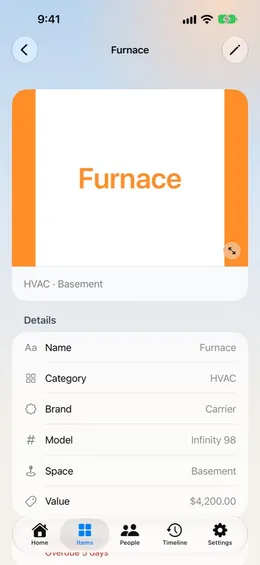
Every item, with its details 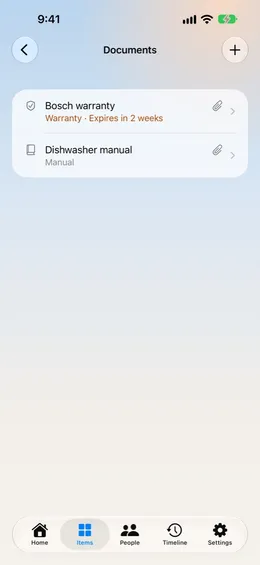
Receipts and warranties 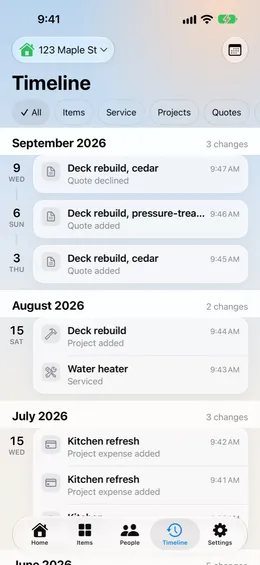
The full timeline 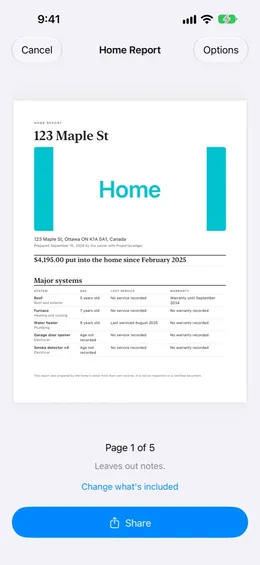
A Home Report to share
Your home's record stays yours.
Everything stays on your iPhone. Turn on iCloud sync to keep it on your other devices, in your own private iCloud storage that only you can read. Read the privacy policy.
- No accountNo sign-up, no sign-in.
- No adsAnd no tracking.
- Nothing collectedNo analytics, no data sent to us.
- Optional iCloudYour own private storage.
Good to know.
Do I need to create an account?
No. PropertyLedger has no accounts of its own. If you turn on sync, it uses the iCloud account already on your iPhone.
Can I keep track of more than one home?
Yes. Add as many homes as you like and switch between them. Contractors are shared across all of them.
How do I give my record to someone else?
Create a Home Report from About this home. Choose what goes in, preview the PDF, and send it.
Is it available in French?
Yes. The app and its privacy and support pages are in English and French.
Where is my data stored?
On your iPhone. If you turn on iCloud sync, it is also kept in your own private iCloud storage, which only you can read.
Start your home's record.
PropertyLedger is coming to the App Store for iPhone, in English and French.